Purchase Order
Please refer to the guide below for detailed information on purchase order module.
Manage Purchase Order: Overview of the purchase order list including their statuses
Manage Purchase Order
- Log on to Chillhub App
- Navigate the purchase order page by selecting Menu → Purchase Order

- The following options are located on the toolbar
- Search: Allows you to search for specific data
- Refresh: Updates the current view by reloading the data
- Export to Excel: Enables exporting the current view data to an Excel file.
- New: Creates a new entry or record in the system.
- Additional Filter & Summary:
- Select Month: a calendar selector that allows you to filter purchase orders by a specific month.
- Monthly Total: Displays a summarized breakdown of the amounts for the selected month
- Monthly Total Ordered: The total value of orders placed within the month.
- Monthly Total Invoiced: The total value of invoices issued within the month.
- Data Table: (Note that some of these columns may be hidden in the row details)
- : Expand row to view more details.
- : Modify purchase order details (Mobile View: expand row to access)
- : Duplicate an existing purchase order (Mobile View: expand row to access)
Notes: Delivery, invoices details will not be copied over - : Opens a menu with additional options
- : Restock delivery items from the purchase order to the selected warehouses.
- Purchase Order No.: The unique identifier for the purchase order
- Status: Shows the current status of the purchase order (e.g., Draft, Issued, Cancelled)
- Draft: The purchase order has been created but not yet finalized or sent to the supplier.
- Issued: The purchase order has been finalized and sent to the supplier.
- Cancelled: The purchase order has been canceled. All related costs, invoices, and deliveries will be reversed.
- Date: The date the purchase order was issued.
- Supplier: The name of the supplier associated with the purchase order.
- Address: Shows the address of the supplier.
- City: The city where the supplier is located.
- Contact No.: The contact number for the supplier.
- Remark: Any additional notes or remarks related to the purchase order.
- Employee: The name of the employee (e.g. salespersons) responsible for the purchase order.
- Total: The total amount of the purchase order.
- Currency: The currency code used for this document (e.g., MYR, USD).
- Invoiced: The total amount billed through purchase invoices for the purchase order.
- Delivery Status: Displays the current delivery status (e.g., None, Partial, Shipped) of the purchase order.
- None: No delivery has been initiated or scheduled.
- In Transit: Some items are planned for delivery but not yet delivered to the warehouse.
- Partial: Some items have been delivered to the warehouse, but not all.
- Shipped: All ordered items have been delivered and replenished in the warehouse.
- Return: Some items are scheduled for return but pending.
- Cancelled: The purchase order has been canceled, any associated delivery and replenishment have been reversed.
- Payment Status: Indicates the payment status (e.g., Not Paid, Partial, Paid, Overpaid) of the purchase invoices.
- Not Paid: No payment has been made towards the purchase invoice.
- Partial: A partial payment has been made, but the full amount is still outstanding.
- Paid: The full amount of the purchase invoices has been paid.
- Overpaid: The amount paid exceeds the purchase invoice total.
- Cancelled: The purchase order has been canceled, so payment has been reversed.
- Invoice Status: Indicates invoice status of the purchase order
- None: No purchase invoice has been received.
- Partial: Some items from the purchase order have been invoiced.
- Completed: All items in the purchase order have been fully invoiced.
- Cancelled: The purchase order has been canceled, and all associated invoices have been voided.
- Invoice No: A list of related purchase invoice no., separated by a semicolon (“;”).

Purchase Order Form
General: Key details such as purchase order number, date and supplier information
General

- Status: Shows the current status of the purchase order (e.g., Draft, Issued, Cancelled)
- Employee: The name of the employee (e.g. salespersons) responsible for the purchase order.
- Purchase Order No.: The unique identifier for the purchase order. Automatically generated by the system.
If an purchase order number conflict occurs, click the Refresh icon to generate a new purchase order number - Date: The date the purchase order was issued.
- Supplier
- : Opens the AI Extract Profile dialog to automatically populate supplier information using AI.
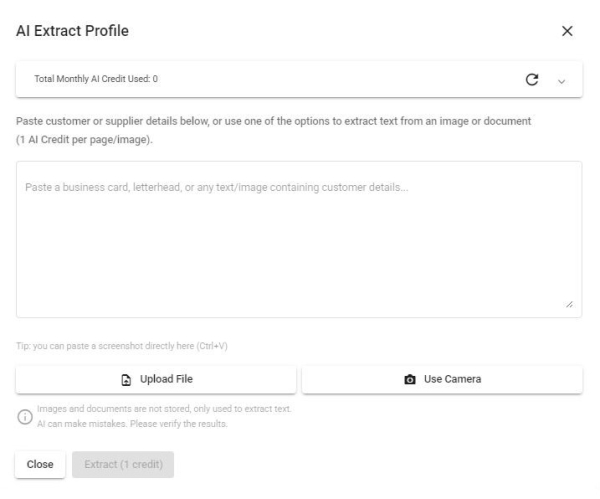
- Paste Text: Paste unstructured text (e.g. an email signature, business card text, or free-form notes) into the text box, then click Extract.
- Paste Image: Paste a screenshot or copied image (e.g. from a chat app or email) directly into the text box using Ctrl+V — useful when the customer's information is shared as a picture rather than text.
- Upload File: Upload an image or PDF (e.g. a business card, letterhead, or invoice). PDFs longer than 5 pages will prompt you to select a page range.
- Use Camera: Capture a photo directly using your device's camera (e.g. to scan a physical business card).
- AI will identify and extract fields such as Name, Contact No., Person in Charge, Email, ID Type & No., Tax Identification No., SST Registration No., and Address (including Postcode, City, State, Country).
- Note: To use AI Extract Profile, make sure to activate the AI Productivity add-on in your subscription. Each text request, image, or PDF page costs 1 credit. Your current usage and remaining free balance are always visible at the top of this dialog.
- Supplier: The name of the supplier associated with the purchase order.
- Contact No.: The contact number for the supplier.
- : Click to open WhatsApp chat with the customer.
- Person in Charge: The main contact person at the supplier company.
- Email Address: Supplier's email address.
- Address: Billing address of the supplier
- : Click to open the location in Google Maps.
- Postcode: Billing postcode of the supplier
- City: Billing city of the supplier
- State: Billing state of the supplier
- Country: Billing country of the supplier
- Term: The payment term agreed with the supplier
- More Information
- Currency: The currency code used for this document (e.g., MYR, USD).
- Activate Multi-currency add-on in the subscription plan to select foreign currencies.
- Exchange Rate: The rate used to convert the document currency to the base currency (Available only when a foreign currency is selected).
- : Fetches the exchange rate from Bank Negara Malaysia, with fallback to other providers if not available.
- Remark: Any additional notes or remarks related to the purchase order.

Items: Adding and managing products in the purchase order.
Items

- The following options are located on the toolbar
- Currency Button Toggles: Switch the displayed amounts between local and foreign currencies (Available only when a foreign currency is selected).
- New: Add a new item.
- Data Table: (Note that some of these columns may be hidden in the row details)
- : Expand row to view more details. (available only in Mobile View)
- : Modify item details (Mobile View: expand row to access)
- : Delete item (Mobile View: expand row to access)
- : More options
- Move Up: Shift the selected item upward in the list
- Move Down: Shift the selected item downward in the list.
- Item: The name the item being ordered
- Qty: The quantity of the item being ordered
- UOM: The unit of measurement for the item (e.g., pcs, kg, liters)
- Unit Price: The price per unit of the item in the order.
- Subtotal: The total price for the item, calculated as Qty × Unit Price.
- Footer:
- Total: The total amount of the order.
- Item Form

- Industry: Select the relevant industry to populate the options for Product dropdowns
- Product: Select the specific item to be ordered
- Qty: The quantity of the item.
- UOM: The unit of measurement for the item (e.g., pcs, kg, liters)
- For items with UOM conversion, an alternate UOM can be selected to ensure accurate inventory tracking.
- Unit Price: The price per unit of the item.
- When a foreign currency is selected, Unit Price is shown in both local and foreign currencies.
- Updates to Unit Price in either currency will automatically recalculate the corresponding value using the exchange rate.
- Subtotal: The total price for the item, calculated as Qty × Unit Price.
- When a foreign currency is selected, Subtotal is shown in both local and foreign currencies.

Delivery: Specify delivery details and the warehouse for stock replenishment.
Delivery

- The following options are located on the toolbar
- Delivery Status: Displays the current delivery status (e.g., None, Partial, Shipped) of the purchase order.
- None: No delivery has been initiated or scheduled.
- In Transit: Some items are planned for delivery but not yet delivered to the warehouse.
- Partial: Some items have been delivered to the warehouse, but not all.
- Shipped: All ordered items have been delivered and replenished in the warehouse.
- Return: Some items are scheduled for return but pending.
- Cancelled: The purchase order has been canceled, any associated delivery and replenishment have been reversed.
- New: Add a new delivery note.
- Add More:
- New Return Note: Create a new return note.
- Data Table: (Note that some of these columns may be hidden in the row details)
- : Expand row to view more details. (available only in Mobile View)
- : Modify delivery/return note details (Mobile View: expand row to access)
- : Delete delivery/return note (Mobile View: expand row to access)
- Delivery/Return Note No. :The unique identifier for the delivery/return note
- Delivery Date: The date when the goods were delivered/returned.
- Remark: Any additional notes or comments related to the delivery/return
- Replenish: Button to edit replenishment information for the delivery items. (Button is disabled if there are unsaved delivery order changes).
- Delivery/Return Form


- Delivery/Return Note No. :The unique identifier for the delivery/return note.
- Delivery/Return Date: The date when the goods were delivered/returned.
- Data table for Delivery Note
- Product: The specific item or product being delivered.
- Balance: The remaining quantity of the product yet to be delivered.
- Qty to Deliver: The quantity of the product to be delivered in this delivery note.
- Data table for Return Note
- Product: The specific item or product being returned.
- Qty to Deliver: The total quantity delivered in other delivery notes.
- Qty to Return: The quantity of the product to be returned in this return note.
- Auto replenish to/ Auto return from:
- Auto replenish to: Automatically replenish and increase the quantity on hand to the selected warehouse. (Only at Delivery Note)
- Auto return from: Automatically return and deduct the quantity on hand from the selected warehouse. (Only at Return Note)
- Alternatively, users can perform replenishment on the Replenishment page, where multiple warehouse selections and serial number barcode scanning are supported
- Remark: Any additional notes or comments related to the delivery
- Form Validations:
- The quantity to deliver cannot be less than the quantity already delivered (Replenished).
- The quantity to return cannot be less than the quantity already returned (Shipped).
- At least one item must be marked for delivery.
- The quantity to deliver cannot exceed the ordered quantity.
- The quantity to return cannot exceed the quantity to deliver.


Invoices: Recording purchase invoices from suppliers to ensure accurate financial reporting.
Invoices
Manage Purchase Invoices: Manage the purchase invoices list of a purchase order.

- The following options are located on the toolbar
- Invoice Status: Indicates invoice status of the purchase order
- None: No purchase invoice has been received.
- Partial: Some items from the purchase order have been invoiced.
- Completed: All items in the purchase order have been fully invoiced.
- Cancelled: The purchase order has been canceled, and all associated invoices have been voided.
- Payment Status: Indicates the payment status (e.g., Not Paid, Partial, Paid, Overpaid) of the purchase invoices.
- Not Paid: No payment has been made towards the purchase invoice.
- Partial: A partial payment has been made, but the full amount is still outstanding.
- Paid: The full amount of the purchase invoices has been paid.
- Overpaid: The amount paid exceeds the purchase invoice total.
- Cancelled: The purchase order has been canceled, so payment has been reversed.
- New: Add a new purchase invoice.
- Data Table: (Note that some of these columns may be hidden in the row details)
- : Expand row to view more details. (available only in Mobile View)
- : Modify purchase invoice details (Mobile View: expand row to access)
- : Delete purchase invoice (Mobile View: expand row to access)
- Invoice No. :The unique identifier for the purchase invoice.
- Date: The date when the purchase invoice was issued by the supplier.
- Total: The total amount of the purchase invoice, including adjustments (credit/debit notes).
- Payment Status: Payment status of the purchase invoice (e.g., Not Paid, Partial, Paid, Overpaid)
- Footer:
- Total Billed: The total amount of the purchase invoice, including adjustments (credit/debit notes).
- Total Paid: The total payment made to the purchase invoice.
Invoices Form
General: Key details such as invoice number, date, accounting information.

- Invoice No.: The unique identifier for the purchase invoice.
- Date: The date the purchase invoice was issued by the supplier.
- More Information
- Currency: The currency code used for this document (e.g., MYR, USD).
- Activate Multi-currency add-on in the subscription plan to select foreign currencies.
- Exchange Rate: The rate used to convert the document currency to the base currency (Available only when a foreign currency is selected).
- : Fetches the exchange rate from Bank Negara Malaysia, with fallback to other providers if not available.
- Term: The payment term agreed with the supplier
- Accounting: Assign accounts for the purchase invoice. By default, accounts are determined based on Account Charts > Account Rules
- Accounts Payable Account: The account used to track amounts owed to suppliers.
- Inventory Tracking Method: Determines whether inventory and COGS are updated in real time (Perpetual) or at period end (Periodic).
- Perpetual: Purchases are recorded in the Inventory Account, with inventory and COGS updated in real time with each purchase and sale transaction.
- Periodic: Purchases are recorded in the Purchase Account, with inventory and COGS updated manually at the end of each financial period.
- Inventory Account: Records inventory purchases and updates automatically with each purchase and sale. (Disabled when using the Periodic method)
- Purchase Account: Records inventory purchases that are later adjusted into Inventory and COGS at period end. (Disabled when using the Perpetual method)
- Self-billed e-Invoice:
- Self-billed e-Invoice No: The self-billed e-Invoice number linked to the purchase invoice.
- New/Edit Self-billed e-Invoice: Open form to create or modify self-billed e-Invoice linked to the purchase invoice
Self-billed e-Invoices are permitted only under specific circumstances. Please refer to Section 8 of the e-Invoice Guidelines for details on the conditions under which self-billed e-Invoices are allowed.
Items: Specify invoiced quantities and price for each item

- The following options are located on the toolbar
- Currency Button Toggles: Switch the displayed amounts between local and foreign currencies (Available only when a foreign currency is selected).
- Data Table (Note that some of these columns may be hidden in the row details)
- Split an item row into two, allowing different prices to be specified. Useful when the total amount cannot be evenly divided by the item quantity.
- Item: The specific product to be invoiced.
- Balance: The remaining quantity of the product yet to be invoiced.
- Qty: Quantity of the product to be invoiced.
- Unit Price: The invoiced price per unit of the product, which will be used as the cost price.
- Updates to Unit Price in either currency will automatically recalculate the corresponding value using the exchange rate.
Adjustments: Manage credit and debit notes for the invoice modifications.

- The following options are located on the toolbar
- Currency Button Toggles: Switch the displayed amounts between local and foreign currencies (Available only when a foreign currency is selected).
- Data Table (Note that some of these columns may be hidden in the row details)
- : Expand row to view more details. (available only in Mobile View)
- : Modify credit/debit note details (Mobile View: expand row to access)
- : Delete credit/debit note (Mobile View: expand row to access)
- Credit/Debit Note No: The unique identifier for the credit or debit note associated with the invoice
- Date: The date when the credit or debit note was issued.
- Amount: The total value of the credit or debit note.
- Description: A brief description or reason for the credit or debit note.
- Adjustment Form:

- Credit/Debit Toggle: Allows switching between a credit note and a debit note based on the adjustment type.
- Date: The date when the credit or debit note was issued.
- Description: A brief explanation or reason for issuing the credit or debit note.
- Product Adjustment: Modify the invoiced quantity of a product to ensure accurate cost calculation.
- Currency Button Toggles: Switch the displayed amounts between local and foreign currencies (Available only when a foreign currency is selected).
- Product: The specific item or product being adjusted.
- Original Qty: Original invoiced quantity
- Original Price: Original invoiced price
- New Qty: The adjusted quantity, updated in cases of returns or quantity changes. Amount will be recalculated automatically.
- New Price: The adjusted unit price, updated in cases of discounts or price changes. Amount will be recalculated automatically.
- Updates to New Price in either currency will automatically recalculate the corresponding value using the exchange rate.
- Amount: The total value of the credit or debit note. Updating this will automatically distribute the adjustment across the New Price for each item.
- If the adjustment cannot be evenly distributed across all items, split the invoice item first.
- When a foreign currency is selected, Amount is shown in both local and foreign currencies.
- Updates to Amount in either currency will automatically recalculate the corresponding value using the exchange rate.
- Exchange Rate: The rate used to convert the document currency to the base currency (Available only when a foreign currency is selected).
- : Fetches the exchange rate from Bank Negara Malaysia, with fallback to other providers if not available.
- Accounting: Assign accounts for the purchase credit/debit notes. By default, accounts are determined based on Account Charts > Account Rules
- Purchase Account: Records inventory purchases that are later adjusted into Inventory and COGS at period end. (Disabled when using the Perpetual method)
- Original Total: The total billed amount before the credit or debit note is applied.
- When a foreign currency is selected, Original Total is shown in both local and foreign currencies.
- New Total: The total billed amount after the credit or debit note is applied
- When a foreign currency is selected, New Total is shown in both local and foreign currencies.
- When a purchase credit note or debit note is created, both Cost of Goods Sold (COGS) and inventory values may be affected, depending on whether the purchased goods have already been sold to customers.
- A business purchases 10 units of items at RM50 per unit from a supplier.
- The supplier later provides a RM50 discount, effectively reducing the cost per unit to RM45 (RM50 ÷ 10).
- If 6 units remain in inventory, the inventory value is reduced by RM30 (6 x RM5).
- If 4 units have already been sold, the system adjusts COGS to reflect the lower cost, reducing expenses by RM20 (4 x RM5)
- These adjustments will be reflected in journal entries and financial reports, ensuring accurate financial tracking.

Payments: Recording payments of purchase invoices.

- The following options are located on the toolbar
- Payment Status: Indicates the payment status (e.g., Not Paid, Partial, Paid, Overpaid) of the purchase invoices.
- Not Paid: No payment has been made towards the purchase invoice.
- Partial: A partial payment has been made, but the full amount is still outstanding.
- Paid: The full amount of the purchase invoices has been paid.
- Overpaid: The amount paid exceeds the purchase invoice total.
- Cancelled: The purchase order has been canceled, so payment has been reversed.
- Currency Button Toggles: Switch the displayed amounts between local and foreign currencies (Available only when a foreign currency is selected).
- New: Add a new payment.
- Data Table: (Note that some of these columns may be hidden in the row details)
- : Expand row to view more details. (available only in Mobile View)
- : Modify payment details (Mobile View: expand row to access)
- Date: The date the payment was made.
- Method: The method used for the payment (e.g., Cash, Credit Card, Bank Transfer)
- Amount: The amount paid.
- Remark: Additional notes or comments regarding the payment.
- Footer:
- Total Billed: The total amount billed on the purchase invoice and credit/debit notes.
- Total Paid: The total amount that has been paid.
- Amount Due: The outstanding balance that remains to be paid, calculated as Total Billed minus Total Paid.
- Payment Form

- Date: Specify the date the payment was made.
- Method: Select the payment method used (Cash, Bank Transfer, Credit Card, Debit Card, E-Wallet, Cheque, Others)
- Refund: A checkbox to indicate that the payment is a refund. When selected, the system treats the transaction as a negative payment, deducting the amount from the total paid
- Amount: The amount paid.
- When a foreign currency is selected, Amount is shown in both local and foreign currencies.
- Updates to Amount in either currency will automatically recalculate the corresponding value using the exchange rate.
- Exchange Rate: The rate used to convert foreign currency payments to local currency (Available only when a foreign currency is selected).
- : Fetches the exchange rate from Bank Negara Malaysia, with fallback to other providers if not available.
- Updates to the payment exchange rate will automatically recalculate the foreign exchange gain or loss.
- Ref. No.: A reference number for the payment (e.g., transaction ID, cheque number).
- Foreign Exchange Gain/Loss: The gain or loss resulting from exchange rate differences between the invoice and the payment.
- Accounting: Assign accounts for the selected payment. By default, accounts are determined based on Account Charts > Account Rules
- Cash Account: Specifies the bank or cash account where the payment is made.
- Foreign Exchange Gain/Loss Account: The account used to record any foreign exchange gain or loss arising from differences between invoice and payment exchange rates.
- Only available only when a foreign currency is selected.
- Remark: Optional field for additional notes or comments related to the payment.

Documents: Attach and store scanned copies of the purchase invoices.

- Attachment: Attach supplier invoices as images or PDF files.
- Upload Receipt: Click Upload Receipt and select an image/pdf file.
- Alternatively, simply drag your file from your computer and drop it into the designated upload area
- Attachment Options:
- : Open and preview the image or PDF.
- : Remove the attachment.
- : Rotate an uploaded image (not applicable to PDFs).
- : AI-Powered Invoice Extraction: Automatically extract the Invoice Date, Invoice Number, Item Quantities, and Unit Prices.
- Uses fuzzy matching to pair lines with your products. Non-product charges (e.g. delivery charges) and taxes are automatically distributed proportionally across the items.
- Tailor the AI's instructions to your needs under Settings > Purchase > AI Purchase Invoice Extraction Rules.
- Note: Requires the AI Productivity add-on. Each request consume AI Credits dynamically based on the amount of content extracted. You can track your remaining free balance at the top of this dialog.
- PDFs longer than 5 pages will prompt you to select a page range
Document: Edit the header and footer templates of the purchase order.
Document

- Subject: The subject line of the purchase order. Defaulted to the purchase order subject configured in Settings.
- Footer: The footer section of the purchase order. Defaulted to the purchase order footer configured in Settings.
- Select Template: Choose an alternative template for your Subject/Footer. (Configure additional templates in Settings ➔ More Templates.)
Form Actions: Available actions such as saving, canceling, sharing or printing the purchase order
Form Actions
- View Document: View, print and share purchase order document.
- Save & Close: Save and close the form
- Save as Draft: Save the purchase order as a draft for further edits.
- Save as Issued: Finalize and issue the purchase order to the supplier.
- Save and Cancel: Cancel the purchase order along with any associated deliveries, invoices, costs, and payments.
- Save & Continue: Save and leave the form open
- Save as Draft: Save the purchase order as a draft for further edits.
- Save as Issued: Finalize and issue the purchase order to the supplier.
- Save and Cancel: Cancel the purchase order along with any associated deliveries, invoices, costs, and payments.