Sales Order
When to use a Sales Order
- Confirmed Order: When sales or service orders are confirmed but have not yet been delivered.
- Partial Delivery: Only part of the order has been delivered and a full invoice cannot be issued yet.
- Advance Payment: An advance payment or deposit is required before final invoicing, a sales order can be used to generate a proforma invoice for collection.
Please refer to the guide below for detailed information on sales order module.
Manage Sales Order: Overview of the sales order list including their statuses
Manage Sales Order
- Log on to Chillhub App
- Navigate the Sales Order page by selecting Menu → Sales Order

- The following options are located on the toolbar
- Search: Allows you to search for specific data
- Refresh: Updates the current view by reloading the data
- Export to Excel: Enables exporting the current view data to an Excel file.
- New: Creates a new entry or record in the system.
- Additional Filter & Summary:
- Select Month: a calendar selector that allows you to filter sales order by a specific month.
- Monthly Total: Displays a summarized breakdown of the sales order amounts for the selected month
- Total Incl. Tax: The total sales order amount, including SST taxes.
- Total Excl. Tax: The total amount before SST taxes are applied.
- Total Tax: The total SST tax amount for all sales orders during the selected month.
- Data Table: (Note that some of these columns may be hidden in the row details)
- : Expand row to view more details.
- : Modify sales order details (Mobile View: expand row to access)
- : Duplicate an existing sales order (Mobile View: expand row to access)
Notes: Payment, delivery details will not be copied over - : Opens a menu with additional options
- : Create a new invoice or modify an existing one for the sales order.
- : Assign teams and schedule the service or delivery date on the calendar.
- : Ship the delivery items on the sales order from the selected warehouses
- Sales Order No.: The unique identifier for the sales order
- Status: Shows the current status of the sales order (e.g., Pending, Confirmed, Cancelled)
- Pending: The sales order has not yet been finalized.
- Confirmed: The sales order has been finalized and sent to the customer.
- Cancelled: The sales order has been canceled, and all associated payments and deliveries will be reversed
- Date: The date the sales order was placed
- Customer: The name of the customer associated with the sales order.
- Address: Shows the address of the customer.
- City: The city where the customer is located.
- Contact No.: The contact number for the customer.
- Term: The payment term agreed with the customer.
- External Code: External reference code used to link this customer to an external accounting system.
- Remark: Any additional notes or remarks related to the sales order.
- Purchase Order No.: The purchase order number related to the sales order.
- Quotation No.: Displays the quotation number related to the sales order.
- Invoice No.: The invoice number associated with the sales order.
- Once a sales order has been invoiced, it can no longer be edited. Any modifications should be made directly to the corresponding invoice.
- Employee: The name of the employee (e.g. salespersons) responsible for the sales order.
- Total Incl. Tax: The total amount of the sales order, including applicable taxes.
- Total Tax Amount: The total amount of SST tax applied to the sales order.
- Total Excl. Tax: The total amount of the sales order, excluding taxes.
- Paid: Total amount paid toward the sales order.
- Currency: The currency code used for this document (e.g., MYR, USD).
- Delivery Status: Displays the current delivery status (e.g., None, Partial, Shipped) of the sales order.
- N/A: No deliverable items is included.
- None: No delivery has been initiated or scheduled.
- Partial: Some items have been delivered or planned for delivery, but not all.
- Ready: All items are ready for delivery but have not yet been dispatched.
- Return: Some items are scheduled for return but pending.
- Shipped: The delivery has been completed and shipped to the customer.
- Cancelled: The sales order has been canceled, any associated delivery and shipping have been reversed.
- Job Completion Status:
- N/A: No service items is included.
- None: No job completion note recorded yet.
- Partial: Some services completed, others pending.
- Completed: All service items are fully completed.
- Cancelled: The invoice has been canceled.
- Payment Status: Indicates the payment status (e.g., Not Paid, Partial, Paid, Overpaid) of the sales order.
- Not Paid: No payment has been made towards the sales order.
- Partial: A partial payment has been made, but the full amount is still outstanding.
- Paid: The full amount of the sales order has been paid.
- Overpaid: The amount paid exceeds the sales order total.
- Cancelled: The sales order has been canceled, so payment has been reversed.
- Scheduled: Indicates whether the sales order has been scheduled for service and delivery.
- Accounting Sync Status: Current synchronization status of the prepayments with the external accounting system.
- Pending – The payments are queued for synchronization.
- Synced – The payments have been successfully synchronized.
- Cancelling – A cancellation request is being processed.
- Cancelled – The payments has been successfully cancelled in the external accounting system.
- Error – Synchronization failed due to an error.
- Not Synced – The payment has not been sent for synchronization.

Sales Order Form
Accessing Sales Order Form
- From Sales Order Page: Click the New button to create a new sales order. To modify an existing sales order, click the Edit icon on the corresponding row in the data table.
- From Quotation Page: On the data table row, click the Options button to open a menu, then select Create/Edit Sales Order to create or modify the corresponding sales order.
- All quotation information, items will be copied over to the sales order.
- From Scheduling Form: Create or edit the scheduled job, go to More Information panel, click New Sales Order or Edit Sales Order button to create or modify the corresponding sales order.
- Customer information copied over to the invoice. If the job details differ from the billing information, update them accordingly.
- From Shipping Page: On the data table row for an sales order shipping record, click the Edit button to modify the corresponding sales order.
General: Key details such as sales order number, date and customer information
General

- Status: Shows the current status of the sales order (e.g., Pending, Confirmed, Cancelled)
- Employee: The name of the employee (e.g. salespersons) responsible for the sales order.
- Sales Order No.: The unique identifier for the sales order. Automatically generated by the system.
If an sales order number conflict occurs, click the Refresh icon to generate a new sales order number - Date: The date the sales order was issued.
- Customer
- Billing: The customer's billing information, used for invoicing
- : Opens the AI Extract Profile dialog to automatically populate customer information using AI.
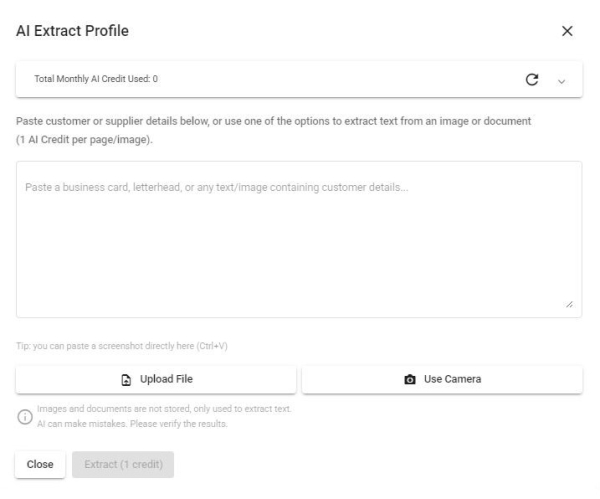
- Paste Text: Paste unstructured text (e.g. an email signature, business card text, or free-form notes) into the text box, then click Extract.
- Paste Image: Paste a screenshot or copied image (e.g. from a chat app or email) directly into the text box using Ctrl+V — useful when the customer's information is shared as a picture rather than text.
- Upload File: Upload an image or PDF (e.g. a business card, letterhead, or invoice). PDFs longer than 5 pages will prompt you to select a page range.
- Use Camera: Capture a photo directly using your device's camera (e.g. to scan a physical business card).
- AI will identify and extract fields such as Name, Contact No., Person in Charge, Email, ID Type & No., Tax Identification No., SST Registration No., and Address (including Postcode, City, State, Country).
- Note: To use AI Extract Profile, make sure to activate the AI Productivity add-on in your subscription. Each text request, image, or PDF page costs 1 credit. Your current usage and remaining free balance are always visible at the top of this dialog.
- : Scan Taxpayer QR code from MyInvois App to automatically populate customer information.
- Customer: The name of the customer to whom the invoice is issued.
- Contact No.: The contact number for the billing customer.
- : Click to open WhatsApp chat with the customer.
- Person in Charge: The main contact person at the billing customer’s company.
- Email Address: The billing customer's email address.
- Individual/Company Toggle: A button to switch between Individual and Company modes, ensuring only the relevant customer information is displayed.
- ID Type: The type of identification used, such as NRIC, BRN (Business Registration Number), Passport No., or Army ID.
- ID No.: The customer identification number corresponding to the selected ID type.
Note: For BRN, use the new format (e.g., 202001234567). - SST Reg. No.: The Sales and Services Tax (SST) registration number of the customer (Only required for SST-registrant)
E.g. A01-2345-67891012 - Tax Identification No.: Tax Identification Number (TIN) of the customer. Company TIN is mandatory, while the Default TIN can be used for individuals.
E.g. C2584563222- : Retrieve Tax Identification Number (TIN) from the MyInvois System using the corresponding ID Number (e.g., NRIC, BRN).
- Use Default TIN: Use EI00000000010 as Tax Identification Number.
- Address: Billing address of the customer
- : Click to open the location in Google Maps.
- Postcode: Billing postcode of the customer
- City: Billing city of the customer
- State: Billing state of the customer
- Country: Billing country of the customer
- Terms: The payment terms agreed with the customer (Configure options at Settings → Terms)
- External Code: External reference code used to link this customer to an external accounting system.
- Only available when integration with an external accounting system is enabled. Please contact Chillhub for more information.
- Select «New» to automatically create a new customer record in the external accounting system.
- A Default Debtor Code can be configured in the system settings and selected for general or walk-in customers.
- Clear all button: Reset all entered customer billing info and start fresh.
- Delivery: The customer's delivery information, used for shipping or service (Only required to fill in the fields differ from billing info)
- Different from billing info: Enable this option if any customer's delivery details are not the same as their billing information.
- : Opens the AI Extract Profile dialog to automatically populate customer information using AI.
- Paste Text: Paste unstructured text (e.g. an email signature, business card text, or free-form notes) into the text box, then click Extract.
- Paste Image: Paste a screenshot or copied image (e.g. from a chat app or email) directly into the text box using Ctrl+V — useful when the customer's information is shared as a picture rather than text.
- Upload File: Upload an image or PDF (e.g. a business card, letterhead, or invoice). PDFs longer than 5 pages will prompt you to select a page range.
- Use Camera: Capture a photo directly using your device's camera (e.g. to scan a physical business card).
- AI will identify and extract fields such as Name, Contact No., Person in Charge, Email, ID Type & No., Tax Identification No., SST Registration No., and Address (including Postcode, City, State, Country).
- Note: To use AI Extract Profile, make sure to activate the AI Productivity add-on in your subscription. Each text request, image, or PDF page costs 1 credit. Your current usage and remaining free balance are always visible at the top of this dialog.
- Customer: The name of the customer to whom goods and services are delivered.
- Contact No.: The contact number for the delivery customer.
- : Click to open WhatsApp chat with the customer.
- Person in Charge: The main contact person at the delivery customer’s company.
- Email Address: The delivery customer's email address.
- Address: Delivery address of the customer
- : Click to open the location in Google Maps.
- Postcode: Delivery postcode of the customer
- City: Delivery city of the customer
- State: Delivery state of the customer
- Country: Delivery country of the customer
- Clear all button: Reset all entered customer delivery info and start fresh.
- More Information
- Industrial Classification (MSIC) Code: Select the appropriate MSIC Code, which is required for e-Invoice submission.
Defaulted to default MSIC Code in the Profile- Click the “X” on the right to clear the textbox.
- Type in keywords related to your business type (e.g., “retail,” “manufacturing,” “information technology”) to narrow down your options.
- Choose the most relevant MSIC Code that best describes your business activities.
- Visit Official MSIC Code System to find out more MSIC code details
- P/O No.: The Purchase Order number associated with the sales order.
- Quotation No.: The quotation number related to the sales order. (Auto populated if sales order is created from quotation)
- : View or edit the linked quotation.
- Invoice No.: The invoice number linked to the sales order. (Auto populated if invoice is created from sales order)

* : View or edit the linked invoice.
- SST Tax Rate: The applicable Sales and Services Tax (SST) rate for the sales order. Defaulted to default SST Rate in Settings
- SST Tax Type: The applicable Sales and Services Tax (SST) type for the sales order. Defaulted to default SST Type in Settings
- Currency: The currency code used for this document (e.g., MYR, USD).
- Activate Multi-currency add-on in the subscription plan to select foreign currencies.
- Exchange Rate: The rate used to convert the document currency to the base currency (Available only when a foreign currency is selected).
- : Fetches the exchange rate from Bank Negara Malaysia, with fallback to other providers if not available.
- Accounting Integration:
- Only available when integration with an external accounting system is enabled. Please contact Chillhub for more information.
- Accounting Sync Status: Displays the current synchronization status of the prepayments with the external accounting system.
- Pending – The payments are queued for synchronization.
- Synced – The payments have been successfully synchronized.
- Cancelling – A cancellation request is being processed.
- Cancelled – The payments has been successfully cancelled in the external accounting system.
- Error – Synchronization failed due to an error.
- Not Synced – The payments have not been sent for synchronization.
- Accounting Sync Timestamp: Shows the date and time when the payments was last synchronized with the external accounting system.
- Accounting Sync Error: Displays the error message returned by the external accounting system, if synchronization fails.
- Retry Sync: Button to retry synchronization for invoices that failed.
- Remark: Any additional notes or remarks related to the sales order.
Items: Adding and managing products or services in the sales order.
Items

- The following options are located on the toolbar
- Currency Button Toggles: Switch the displayed amounts between local and foreign currencies (Available only when a foreign currency is selected).
- New: Add a new item.
- Add More:
- New Section: Create a new section within the sales order. Subtotals will be calculated for each section individually.
- New Discount: Add a discount to the sales order.
- Data Table: (Note that some of these columns may be hidden in the row details)
- : Expand row to view more details. (available only in Mobile View)
- : Modify item details (Mobile View: expand row to access)
- : Delete item (Mobile View: expand row to access)
- : More options
- Add Indent: Indent the selected item
- Remove Indent: Outdent the selected item
- Move Up: Shift the selected item or section upward in the list
- Move Down: Shift the selected item or section downward in the list.
- Item: The name the item being sold
- Qty: The quantity of the item being sold
- UOM: The unit of measurement for the item (e.g., pcs, kg, liters)
- Unit Price: The price per unit of the item.
- Subtotal: The total price for the item, calculated as Qty × Unit Price.
- Footer:
- Total Excl. Tax: The total amount of the sales order, excluding tax.
- Total Incl. Tax: The total amount of the sales order, including tax.
- Total SST: The Sales and Services Tax (SST) amount applied to the sales order.
- Item Form

- Form is read-only once the sales order has been invoiced. Any modifications should be made directly to the corresponding invoice.
- Industry: Select the relevant industry to populate the options for Product, Product Type, and Service dropdowns
- Type: Choose the type of item being sold: Product, Product Type, Service, or Custom
- Product / Service / Product Type / Custom: Select the specific item based on the chosen type.
- Product: Represents specific goods, items and parts offered by the organization
- : Click to view the current inventory level for this product.
- Product Type: Used when specific products are unknown or not tracked in the system.
- Service: Additional charges or non-physical offerings that your company provides
- Custom: Enter free text to define an item not covered by the predefined master data.
- Qty: The quantity of the item.
- UOM: The unit of measurement for the item (e.g., pcs, kg, liters)
- For items with UOM conversion, an alternate UOM can be selected to ensure accurate inventory tracking.
- Non-billable consumption: Materials are deducted from stock for the job but are not charged to the customer or shown on their document.
- Applicable only when item type is Product
- Price cannot be set when this option is enabled.
- Unit Price: The price per unit of the item.
- When a foreign currency is selected, Unit Price is shown in both local and foreign currencies.
- Updates to Unit Price in either currency will automatically recalculate the corresponding value using the exchange rate.
- Subtotal: The total price for the item, calculated as Qty × Unit Price.
- When a foreign currency is selected, Subtotal is shown in both local and foreign currencies.
- SST Taxable: Indicates whether the item is subject to Sales and Services Tax (SST).
- Activate SST add-on in the subscription plan to enable the SST feature.
- Tax Amount: The SST amount applied to the item.
- When a foreign currency is selected, Tax Amount is shown in both local and foreign currencies.
- Total Incl. Tax: The total price for the item, including SST, calculated as Subtotal + Tax Amount.
- When a foreign currency is selected, Total Incl. Tax is shown in both local and foreign currencies.
- Section Form

- Section: The name or description of the section. (Subtotals will be calculated for each section)
- Discount Form

- Discount Description: A brief description of the discount being applied.
- Discount Amount: The monetary value of the discount applied to the item or sales order.
- When a foreign currency is selected, Discount Amount is shown in both local and foreign currencies.
- Updates to Discount Amount in either currency will automatically recalculate the corresponding value using the exchange rate.
- SST Taxable: Indicates whether the discount is subject to Sales and Services Tax (SST).
- Tax Amount: The SST amount applied to the discount.
- When a foreign currency is selected, Tax Amount is shown in both local and foreign currencies.
- Total Incl. Tax: The total discount for the item, including SST, calculated as Discount Amount + Tax Amount.
- When a foreign currency is selected, Total Incl. Tax is shown in both local and foreign currencies.


Delivery: Specify delivery details and the warehouse for stock deduction.
Delivery

- The following options are located on the toolbar
- Delivery Status: Displays the current delivery status (e.g., None, Partial, Shipped) of the sales order.
- N/A: No deliverable items is included.
- None: No delivery has been initiated or scheduled.
- Partial: Some items have been delivered or planned for delivery, but not all.
- Ready: All items are ready for delivery but have not yet been dispatched.
- Return: Some items are scheduled for return but pending.
- Shipped: The delivery has been completed and shipped to the customer.
- Cancelled: The sales order has been canceled, any associated delivery and shipping have been reversed.
- New: Add a new delivery note.
- Add More:
- New Return Note: Create a new return note.
- Data Table: (Note that some of these columns may be hidden in the row details)
- : Expand row to view more details. (available only in Mobile View)
- : Modify delivery/return note details (Mobile View: expand row to access)
- : Delete delivery/return note (Mobile View: expand row to access)
- Delivery/Return Note No. :The unique identifier for the delivery/return note
- Delivery Date: The date when the goods were delivered/returned.
- Remark: Any additional notes or comments related to the delivery/return
- Ship: Button to edit shipping information for the delivery items. (Button is disabled if there are unsaved delivery order changes).
- Delivery/Return Form


- Form is read-only once the sales order has been invoiced. Any modifications should be made directly to the corresponding invoice.
- Delivery/Return Note No. :The unique identifier for the delivery/return note. Automatically generated by the system.
- Delivery/Return Date: The date when the goods were delivered/returned.
- Data table for Delivery Note
- : Click to view the current inventory level for this product.
- Product: The specific item or product being delivered.
- Balance: The remaining quantity of the product yet to be delivered.
- Qty to Deliver: The quantity of the product to be delivered in this delivery note.
- Data table for Return Note
- : Click to view the current inventory level for this product.
- Product: The specific item or product being returned.
- Qty to Deliver: The total quantity delivered in other delivery notes.
- Qty to Return: The quantity of the product to be returned in this return note.
- Auto ship from/ Auto return to:
- Auto ship from: Automatically ships and deducts the quantity on hand from the selected warehouse. (Only at Delivery Note)
- Auto return to: Automatically return and increase the quantity on hand to the selected warehouse. (Only at Return Note)
- Alternatively, users can perform shipping on the shipping page, where multiple warehouse selections and serial number barcode scanning are supported
- Remark: Any additional notes or comments related to the delivery/return
- View Document: View, print and share delivery/return note document.
- Form Validations:
- The quantity to deliver cannot be less than the quantity already delivered (Shipped).
- The quantity to return cannot be less than the quantity already returned (Shipped).
- At least one item must be marked for delivery.
- The quantity to deliver cannot exceed the sales quantity.
- The quantity to return cannot exceed the quantity to deliver.


Job Completion

- The following options are located on the toolbar
- Job Completion Status: Displays the current job completion status (e.g., None, Partial, Completed) of the sales order.
- N/A: No service items is included.
- None: No job completion note recorded yet.
- Partial: Some services completed, others pending.
- Completed: All service items are fully completed.
- Cancelled: The invoice has been canceled.
- New: Add a new Job Completion Note.
- Data Table: (Note that some of these columns may be hidden in the row details)
- : Expand row to view more details. (available only in Mobile View)
- : Modify job completion note details (Mobile View: expand row to access)
- : Delete job completion note (Mobile View: expand row to access)
- Job Completion Note No. :The unique identifier for the job completion note
- Service Date: The date when the services were delivered.
- Remark: Any additional notes or comments related to the services.
- Job Completion Note Form

- Job Completion Note No. :The unique identifier for the job completion note. Automatically generated by the system.
- Service Date: The date when the services were delivered.
- Data table for Job Completion Note
- Service: The specific services being delivered.
- Balance: The remaining quantity of the services yet to be delivered.
- Additional Notes: Optional remarks or details about the service outcome, observations, or other relevant information included in the document.
- Insert Image button: Opens a dialog to upload or select an image (e.g. site photos) and insert it into the editor at the cursor position.
- Remark: Any additional notes or comments related to the job completion note.
- View Document: View, print and share job completion note document.
- Form Validations:
- At least one item must be marked for delivery.
- The quantity to deliver cannot exceed the sales quantity.

Payment: Recording sales order payments
Payment

- The following options are located on the toolbar
- Payment Status: Indicates the payment status (e.g., Not Paid, Partial, Paid, Overpaid) of the sales order.
- Not Paid: No payment has been made towards the sales order.
- Partial: A partial payment has been made, but the full amount is still outstanding.
- Paid: The full amount of the sales order has been paid.
- Overpaid: The amount paid exceeds the sales order total.
- Cancelled: The sales order has been canceled, so payment has been reversed.
- Currency Button Toggles: Switch the displayed amounts between local and foreign currencies (Available only when a foreign currency is selected).
- New: Add a new payment.
- Data Table: (Note that some of these columns may be hidden in the row details)
- : Expand row to view more details. (available only in Mobile View)
- : Modify payment details (Mobile View: expand row to access)
- Date: The date the payment was made.
- Method: The method used for the payment (e.g., Cash, Credit Card, Bank Transfer)
- Amount: The amount paid.
- Remark: Additional notes or comments regarding the payment.
- Footer:
- Total Billed: The total amount billed on the sales order.
- Total Paid: The total amount that has been paid.
- Amount Due: The outstanding balance that remains to be paid, calculated as Total Billed minus Total Paid.
- Payment Form

- Form is read-only once the sales order has been invoiced. Any modifications should be made directly to the corresponding invoice.
- Receipt No.: The unique identifier for the payment receipt. Automatically generated by the system.
- Method: Select the payment method used (Cash, Bank Transfer, Credit Card, Debit Card, E-Wallet, Cheque, Others)
- Date: Specify the date the payment was made.
- Refund: A checkbox to indicate that the payment is a refund. When selected, the system treats the transaction as a negative payment, deducting the amount from the total paid
- Amount: Enter the payment amount. For refunds, input the refunded amount.
- When a foreign currency is selected, Amount is shown in both local and foreign currencies.
- Updates to Amount in either currency will automatically recalculate the corresponding value using the exchange rate.
- Exchange Rate: The rate used to convert foreign currency payments to local currency (Available only when a foreign currency is selected).
- : Fetches the exchange rate from Bank Negara Malaysia, with fallback to other providers if not available.
- Updates to the payment exchange rate will automatically recalculate the foreign exchange gain or loss.
- Ref. No.: A reference number for the payment (e.g., transaction ID, cheque number).
- Foreign Exchange Gain/Loss: The gain or loss resulting from exchange rate differences between the sales order and the payment.
- Accounting: Assign accounts for the selected payment. By default, accounts are determined based on Account Charts > Account Rules and the selected payment method
- Cash Account: Specifies the bank or cash account where the payment is received.
- Unearned Revenue Accounts: Advance payment account where payment received before the invoice is created.
- Foreign Exchange Gain/Loss Account: The account used to record any foreign exchange gain or loss arising from differences between sales order and payment exchange rates.
- Only available only when a foreign currency is selected.
- Remark: Optional field for additional notes or comments related to the payment.
- View Receipt: View, print and share receipt document.

Document: Edit the header and footer templates of the sales order.
Document

- Subject: The subject line of the sales order. Defaulted to the sales order subject configured in Settings.
- Footer: The footer section of the sales order. Defaulted to the sales order footer configured in Settings.
- Select Template: Choose an alternative template for your Subject/Footer. (Configure additional templates in Settings ➔ More Templates.)
Form Actions: Available actions such as saving, canceling, sharing or printing the sales order
Form Actions
- View Document: View, print and share sales order document.
- As Sales Order: Generates a standard sales order document.
- As Proforma Invoice: Generates a proforma invoice for advance payment or quotation purposes.
- As Service Order: Generates a service order document for service-based transactions.
- Save & Close: Save and close the form
- Save as Pending: Save the sales order in a draft state without finalizing it.
- Save as Confirmed: Finalize and confirm the sales order.
- Save as Cancelled: Cancel the sales order along with any associated deliveries and payments.
- Save & Continue: Save and leave the form open
- Save as Pending: Save the sales order in a draft state without finalizing it.
- Save as Confirmed: Finalize and confirm the sales order.
- Save as Cancelled: Cancel the sales order along with any associated deliveries, invoices, costs, and payments.